
llm-in-sandbox
Computer Environments Elicit General Agentic Intelligence in LLMs
Links
README
From the repo.
LLM-in-Sandbox
🌐 Project • 📄 Paper • 💻 LLM-in-Sandbox-RL • 🤗 Huggingface • 📦 Model & Data • 🎬 Youtube • 📽️ Slides • 🕶️ Awesome Computer-Use-Agent • 🦞 ClawGym•
This project is developed by RUC AI Box.
Give your LLM a computer, unlocking general agentic intelligence
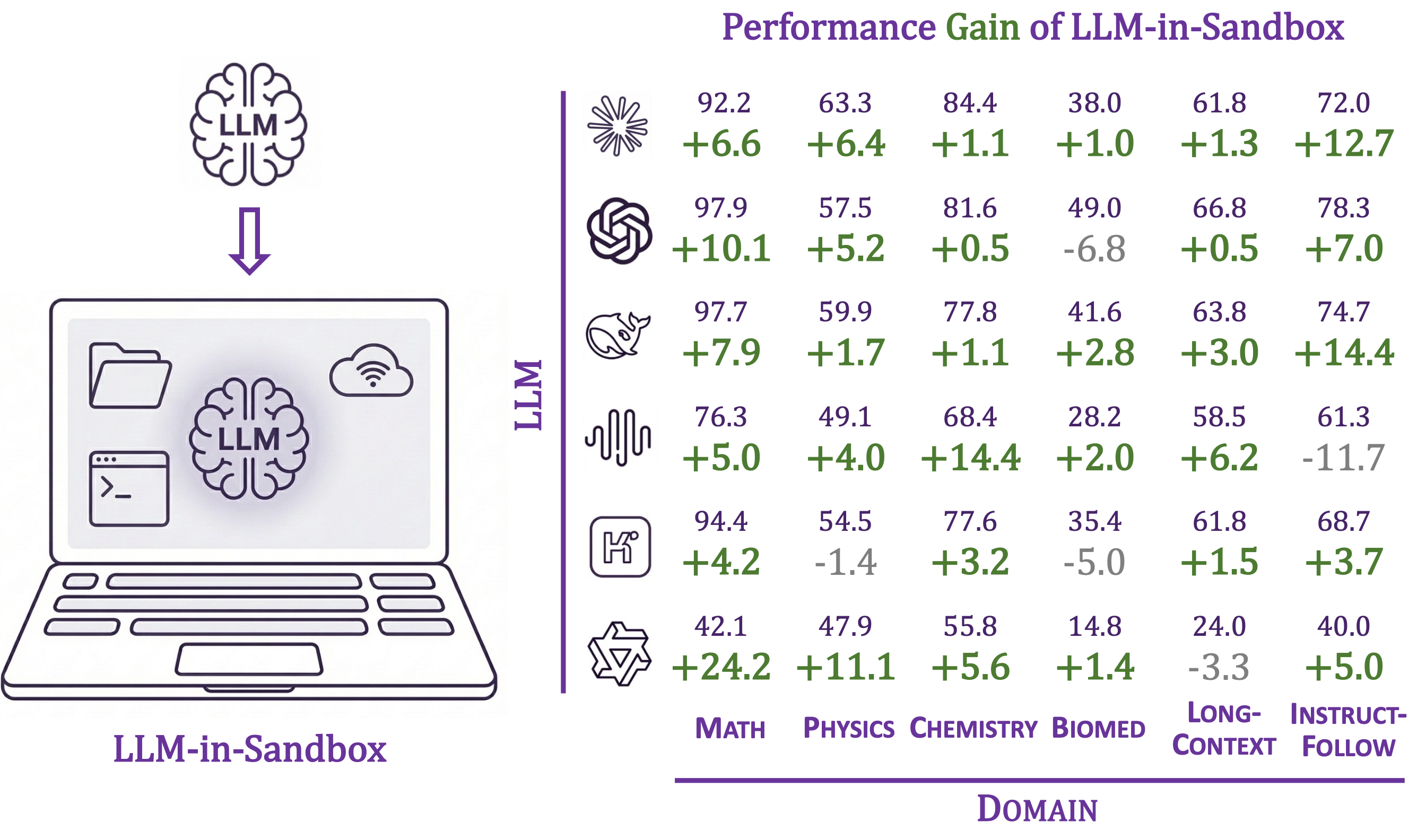
As vibe coding becomes common and 🦞 OpenClaw draws widespread attention, we present a systematic study to show that placing an LLM inside a code sandbox with basic computer functionalities lets it significantly outperform standalone LLMs across chemistry, physics, math, biomedicine, long-context understanding, and instruction-following with no extra training. RL further amplifies the gains.
- 📈 Consistent improvements across diverse non-code domains
- 🧠 File system as long-term memory, up to 8× token savings
- 🐳 Docker isolation for security (vs. unrestricted setups like 🦞 OpenClaw)
- 🔌 Works with OpenAI, Anthropic, vLLM, SGLang, etc.
Feel free to open an issue if you have any questions or run into any problems. We'd be happy to help!
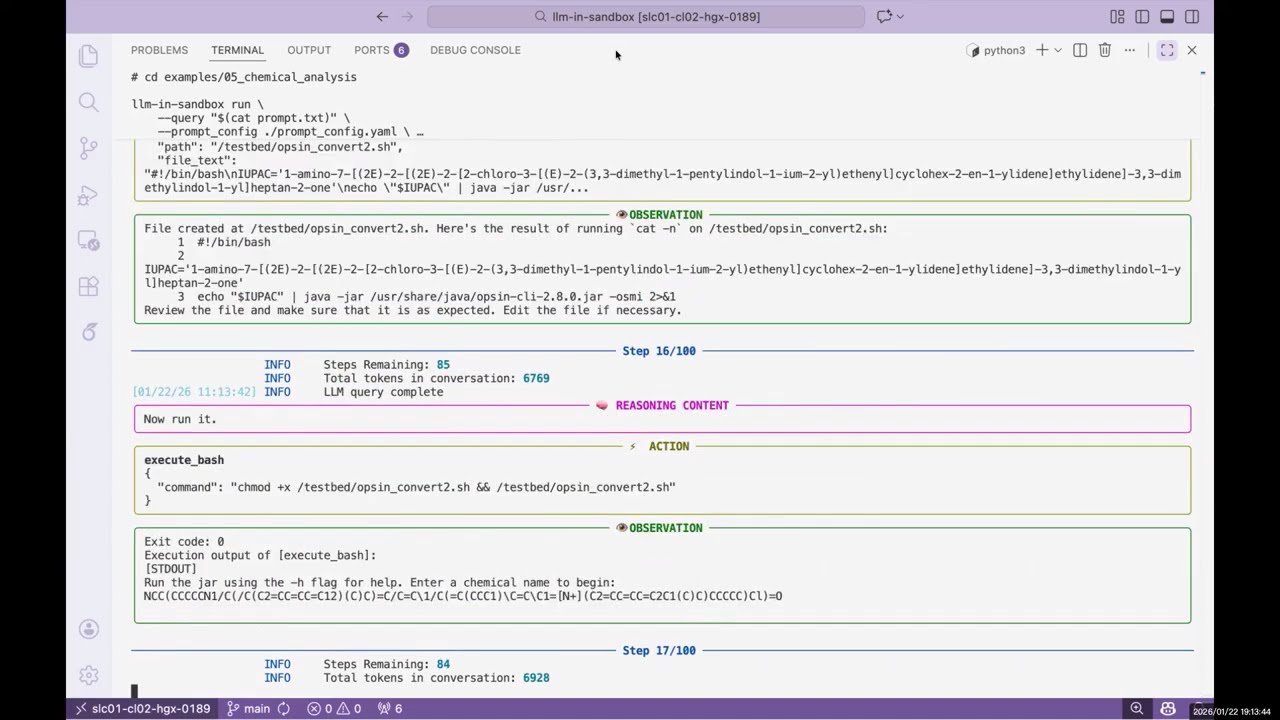
▶️ Click to watch the demo video
News
- [2026-04-30] Released ClawGym, a scalable framework for building effective claw agents, covering data collection, training infra, and evaluation benchmark!
- [2026-04-11] Released scale-openclaw — collect 🦞 OpenClaw trajectories at scale on a single machine, Docker-free.
- [2026-03-25] Released Awesome Computer-Use Agents, a curated list tracking the development of computer-use agents across terminal and GUI paradigms, with an accompanying overview report.
- [2026-03-20] Uploaded talk slides on "LLM-in-Sandbox: From Coding Agent to General Agent".
- [2026-02-12] Released code, model & data, and wandb log for LLM-in-Sandbox Reinforcement Learning at LLM-in-Sandbox-RL.
- [2026-02-11] v0.2.0: Added benchmark module for reproducing paper results, evaluating any LLM, and adding your own tasks.
- [2026-01-23] Released paper, project page, and code. Honored as #1 paper of the day on Hugging Face.
Table of Contents
Installation
Requirements: Python 3.10+, Docker
1. Install Docker
Skip this if Docker is already installed.
curl -fsSL https://get.docker.com -o get-docker.sh && sh get-docker.sh
dockerd > /var/log/dockerd.log 2>&1 &
Or follow the official Docker docs.
2. Install llm-in-sandbox
pip install llm-in-sandbox==0.2.0
Or install from source:
git clone https://github.com/llm-in-sandbox/llm-in-sandbox.git
cd llm-in-sandbox
pip install -e .
Docker Image
The default Docker image (cdx123/llm-in-sandbox:v0.1) will be automatically pulled when you first run the agent. The first run may take a minute to download the image (~400MB), but subsequent runs will start instantly.
System Requirements & Reproducibility Notes
LLM-in-Sandbox is backend-agnostic: it connects to any OpenAI-compatible endpoint, so no local GPU is required when using API services (e.g., OpenAI, Anthropic, or a hosted vLLM/SGLang server). Self-hosting a model is optional, and its hardware needs depend on the chosen model and serving framework.
- Tested on: Ubuntu 22.04 with Python 3.10 and Docker.
- Installation time: ~1 minute on a normal desktop computer (the one-time Docker image pull, ~400 MB, also takes about a minute on a typical connection).
- Demo runtime: the quick-start demo completes in ~1 minute on a normal desktop computer (excluding model inference latency, which depends on your chosen endpoint).
- Dependencies: all Python dependencies are pinned in
pyproject.toml; the sandbox runtime is provided by the Docker imagecdx123/llm-in-sandbox:v0.1, pulled automatically on first run.
Quick Start
LLM-in-Sandbox works with various LLM providers including OpenAI, Anthropic, and self-hosted servers (vLLM, SGLang, etc.).
Option 1: Cloud / API Services
llm-in-sandbox run \
    --query "write a hello world in python" \
    --llm_name "openai/gpt-5" \
    --llm_base_url "http://your-api-server/v1" \
    --api_key "your-api-key"
Option 2: Self-Hosted Models
Using local vLLM server for Qwen3-Coder-30B-A3B-Instruct
1. Start vLLM server:
vllm serve Qwen/Qwen3-Coder-30B-A3B-Instruct \
    --served-model-name qwen3_coder \
    --enable-auto-tool-choice \
    --tool-call-parser qwen3_coder \
    --tensor-parallel-size 8  \
    --enable-prefix-caching
2. Run agent (in a new terminal once server is ready):
llm-in-sandbox run \
    --query "write a hello world in python" \
    --llm_name qwen3_coder \
    --llm_base_url "http://localhost:8000/v1"  \
    --temperature 0.7
Using local SGLang server for DeepSeek-V3.2-Thinking
1. Start sgLang server:
python3 -m sglang.launch_server \
    --model-path "deepseek-ai/DeepSeek-V3.2" \
    --served-model-name "DeepSeek-V3.2" \
    --trust-remote-code \
    --tp-size 8 \
    --tool-call-parser deepseekv32 \
    --reasoning-parser deepseek-v3 \
    --host 0.0.0.0 \
    --port 5678
2. Run agent (in a new terminal once server is ready):
llm-in-sandbox run \
    --query "write a hello world in python" \
    --llm_name DeepSeek-V3.2 \
    --llm_base_url "http://0.0.0.0:5678/v1" \
    --extra_body '{"chat_template_kwargs": {"thinking": True}}'
Parameters (Common)
| Parameter | Description | Default |
|---|---|---|
--query | Task for the agent | required |
--llm_name | Model name | required |
--llm_base_url | API endpoint URL | from LLM_BASE_URL env var |
--api_key | API key (not needed for local server) | from OPENAI_API_KEY env var |
--input_dir | Input files folder to mount (Optional) | None |
--output_dir | Output folder for results | ./output |
--docker_image | Docker image to use | cdx123/llm-in-sandbox:v0.1 |
--prompt_config | Path to prompt template | ./config/general.yaml |
--temperature | Sampling temperature | 1.0 |
--max_steps | Max conversation turns | 100 |
--extra_body | Extra JSON body for LLM API calls | None |
Run llm-in-sandbox run --help for all available parameters.
Output
Each run creates a timestamped folder:
output/2026-01-16_14-30-00/
├── files/
│   ├── answer.txt      # Final answer
│   └── hello_world.py  # Output file
└── trajectory.json     # Execution history
More Examples
We provide examples across diverse non-coding domains: scientific reasoning, long-context understanding, instruction following, travel planning, video production, music composition, poster design, and more.
👉 See examples/README.md for the full list.
Benchmark and Reproduction
Reproduce our paper results, evaluate any LLM in the sandbox, or add your own tasks.
👉 See llm_in_sandbox/benchmark/README.md
Contact Us
Feel free to open an issue if you have any questions or run into any problems, we’d be happy to help! You can also reach us directly at daixuancheng6@gmail.com and shaohanh@microsoft.com.
Acknowledgment
We learned the design and reused code from R2E-Gym. Thanks for the great work!
License
Apache License 2.0. See LICENSE for details.
Citation
If you find our work helpful, please cite us:
@article{cheng2026computer,
  title={Computer environments elicit general agentic intelligence in llms},
  author={Cheng, Daixuan and Huang, Shaohan and Gu, Yuxian and Song, Huatong and Chen, Guoxin and Dong, Li and Zhao, Wayne Xin and Wen, Ji-Rong and Wei, Furu},
  journal={arXiv preprint arXiv:2601.16206},
  year={2026}
}
Collected info
- ★ 244 stars
- ⎇ 21 forks
- Language: Python
- Source updated: 9/22/2026
Config for your environment
Replace {MCP_ENDPOINT_URL} with this MCP’s endpoint URL (from its repo or docs above). No API key — you connect directly.
Tool
OS
Config file: ~/.cursor/mcp.json
{
  "mcpServers": {
    "mcp-server": {
      "url": "{MCP_ENDPOINT_URL}"
    }
  }
}Paste into mcpServers in the config file. Restart Cursor after saving.
If this MCP is also published on mcpchannel.ai, you can subscribe from Browse and use the gateway config there instead.